The OpenWrt Firewall: Your Network's First Line of Defense
In today's interconnected world, network security is paramount. For many enthusiasts and professionals, OpenWrt stands out as a powerful, versatile open-source firmware that transforms consumer routers into highly configurable network devices. At the heart of OpenWrt's robust security capabilities lies its firewall, a critical component that dictates which traffic can enter and leave your network. Understanding how this firewall operates, especially its intricate relationship with the web-based management interface known as Luci, is essential for truly harnessing OpenWrt's potential and safeguarding your digital landscape.
While OpenWrt offers deep command-line control, Luci provides an intuitive graphical gateway to configure even the most complex settings. But have you ever wondered why removing a seemingly simple component might break the entire firewall section in Luci? The answer lies in OpenWrt's modular architecture and specific dependencies that ensure a seamless user experience while maintaining powerful underlying functionality.
Luci's Essential Link: Deconstructing luci-app-firewall
Luci, OpenWrt's default web interface, is not a monolithic application. Instead, it's a modular framework, built upon a core system that allows various "applications" to be installed, each providing specific configuration pages and functionality. For managing your network's defenses, the critical piece of this puzzle is the package known as luci-app-firewall.
This package is the very reason you see a "Firewall" section in your Luci interface. Without it, Luci would simply lack the code, templates, and scripts necessary to display firewall zones, rules, port forwards, and other related settings. It acts as the bridge, translating your graphical clicks and inputs into the specific configurations that the OpenWrt firewall engine understands.
- User Interface (UI) Components:
luci-app-firewallprovides the HTML templates, CSS styles, and JavaScript that render the firewall configuration pages you interact with. - Configuration Parsing and Generation: When you make changes through Luci, this app is responsible for parsing your inputs and writing them correctly to the OpenWrt firewall configuration file, typically located at
/etc/config/firewall. Conversely, it reads from this file to display the current state of your firewall. - Interaction with the Backend: While
luci-app-firewalldoesn't directly implement the firewall rules at the kernel level, it calls upon the underlying OpenWrt firewall service to apply, reload, or disable rules based on your actions.
The dependency is clear: Luci's core framework needs specific application modules to gain specific functionalities. For firewall management, luci-app-firewall is not merely an optional add-on; it's the dedicated interpreter and interface that allows Luci to speak the language of your network's security.
Beyond the Interface: The Underlying Firewall Architecture
While luci-app-firewall provides the user-friendly façade, it's crucial to understand the robust engine that operates beneath it. OpenWrt's firewall system is built on a powerful, layered architecture:
/etc/config/firewall: The Configuration File
This plain-text file uses OpenWrt's UCI (Unified Configuration Interface) syntax to define all your firewall rules, zones, port forwards, and NAT settings. It's the blueprint for your network's security policy.luci-app-firewallis designed to read from and write to this file.- The
firewallPackage: The Scripting Engine
This core OpenWrt package (distinct from the Luci app) is responsible for interpreting the contents of/etc/config/firewall. When you apply changes or the router boots up, the scripts within this package translate the UCI configurations into actual firewall commands. It's the "brain" that translates the high-level policy into executable instructions. iptables/nftables: The Kernel-Level Packet Filter
At the very lowest level, OpenWrt leverages eitheriptables(the traditional Linux packet filtering framework) or its modern successor,nftables. These are kernel-level modules that perform the actual packet inspection, filtering, and manipulation. Thefirewallpackage generates the specificiptablesornftablescommands that the Linux kernel then uses to enforce your rules. This direct interaction with the kernel ensures maximum performance and control over network traffic.
This layered approach provides immense flexibility. While most users will happily manage their firewall through Luci and luci-app-firewall, advanced users can bypass the web interface entirely. They can directly edit /etc/config/firewall, reload the firewall service, or even interact with iptables or nftables directly from the command line, offering unparalleled control and customization.
Practical Implications for OpenWrt Users
Understanding these dependencies has significant practical benefits for any OpenWrt user:
- Troubleshooting Missing Firewall Settings: If your Luci interface suddenly lacks the "Firewall" section, the first place to check is if the
luci-app-firewallpackage is installed and intact. Sometimes, package corruption or accidental uninstallation can cause this. A simple reinstallation usually resolves the issue. - Efficient Configuration: Knowing that Luci works on top of
/etc/config/firewallmeans you can seamlessly switch between the graphical interface and command-line editing. For complex or repetitive tasks, editing the configuration file directly via SSH might be faster. - System Resource Management: OpenWrt routers often have limited resources. Being aware of the modularity helps in understanding which components are running. While
luci-app-firewallis relatively lightweight, it's crucial for management. - Security Audits: When performing a security audit, inspecting
/etc/config/firewalldirectly gives you the most accurate representation of your firewall rules, independent of any potential UI glitches. - Firmware Upgrades: During major OpenWrt upgrades, sometimes Luci packages need to be reinstalled or updated separately. Being aware of
luci-app-firewallas a specific component ensures you check its status post-upgrade if you encounter issues.
This knowledge empowers you to not just use OpenWrt but to understand its inner workings, making you a more effective network administrator.
Optimizing Your OpenWrt Firewall: Best Practices and Logging
With a solid grasp of how Luci interfaces with OpenWrt's firewall, you're better equipped to optimize its settings for maximum security and performance. A well-configured firewall is your primary defense against unauthorized access and malicious activity.
Essential Firewall Settings
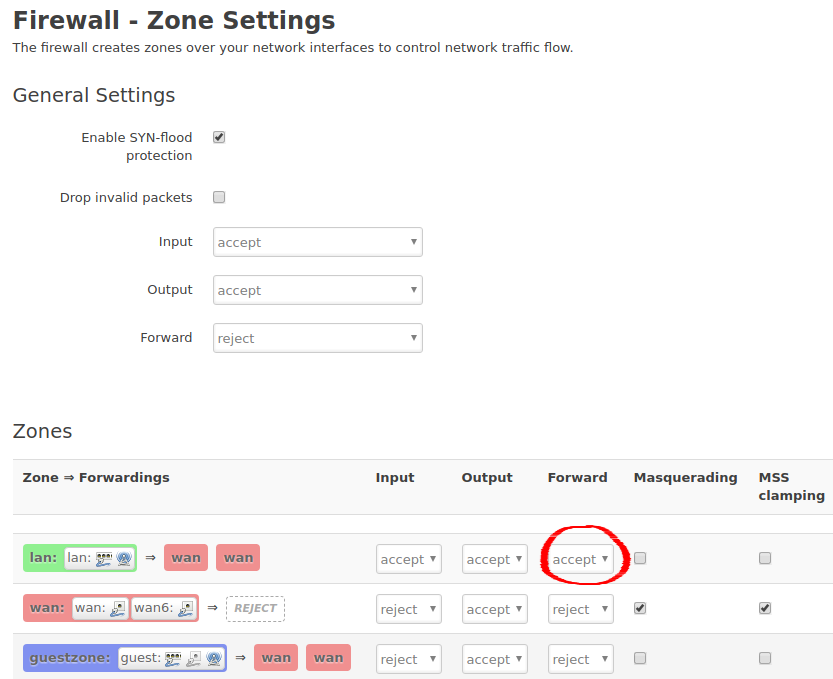
OpenWrt's firewall operates on the concept of "zones." These zones allow you to define distinct network segments (e.g., LAN, WAN, Guest) and control how traffic flows between them. Key settings to consider:
- Default Policy: For internal zones like LAN, the default policy is usually "accept" to allow devices to communicate. For the WAN (internet) zone, the default "reject" or "drop" policy is crucial to block unsolicited incoming connections.
- Input, Output, Forward Rules: Configure rules for traffic entering the router itself (Input), originating from the router (Output), and passing through the router between zones (Forward).
- Port Forwards and NAT: Carefully set up port forwards only when necessary, mapping specific external ports to internal devices. Utilize Network Address Translation (NAT) to allow multiple internal devices to share a single public IP address securely.
- Traffic Rules: Create specific rules to allow or deny certain types of traffic based on source, destination, port, and protocol. Always adhere to the principle of least privilege – only allow what is absolutely necessary.
For a deeper dive into configuring these settings and hardening your network, we recommend exploring our comprehensive guide: Optimize Your Firewall: Essential Settings for Security.
The Power of Firewall Logs
Beyond configuration, monitoring your firewall's activity is vital for maintaining a secure network. OpenWrt's firewall logs provide a window into the traffic attempting to interact with your router and network. These logs can reveal:
- Blocked Connection Attempts: See who (or what) is trying to access your network from the internet. Persistent attempts from unknown IPs can indicate scanning or attack attempts.
- Internal Network Issues: Logs can sometimes highlight misconfigured devices or applications within your own network attempting to connect to prohibited destinations.
- Troubleshooting Rules: If a legitimate service isn't working, firewall logs can show if your rules are inadvertently blocking necessary traffic.
To enable logging, you typically configure specific firewall rules in Luci to log "rejected" or "dropped" packets. You can then view these logs through Luci's "System" > "System Log" section, or more powerfully, via the command line using tools like logread. Interpreting these logs effectively requires some practice, but the insights gained are invaluable for proactive security. Learn more about how to make sense of these critical messages in our article: Decoding OpenWrt Firewall Logs for Network Insights.
Conclusion
The OpenWrt firewall, facilitated by the intuitive Luci web interface and specifically the luci-app-firewall package, represents a cornerstone of robust home and small office network security. Understanding the modular nature of Luci, its dependency on specific applications like luci-app-firewall, and the underlying architecture involving the firewall package and kernel-level iptables/nftables, empowers users with deeper control and troubleshooting capabilities. By embracing this knowledge, actively configuring your firewall with best practices, and diligently monitoring its logs, you can build a more secure, resilient, and optimized network environment with OpenWrt.
